 VisualFlow
Build an Interactive Jigsaw Puzzle App in React
Image Puzzle Studio is an interactive puzzle-building application that combines React Flow's flexible canvas with customizable image puzzle gameplay. It's built with React, @xyflow/react, and TypeScript, and it's part of the Interactive Applications category in the VisualFlow examples library.
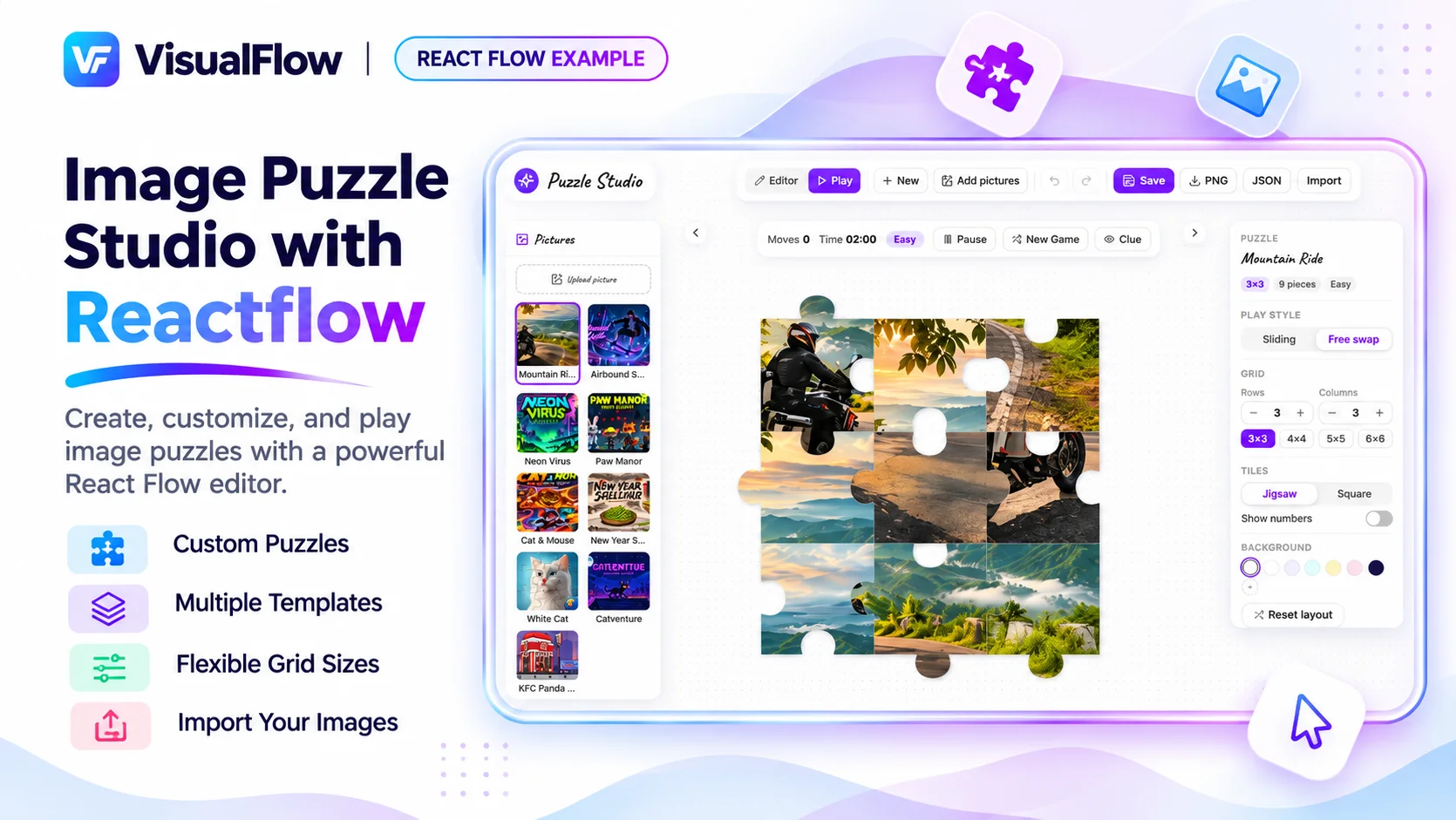
Image Puzzle Studio with React Flow: Build an Interactive Jigsaw Puzzle App in React
Most developers know React Flow as a library for workflow editors, diagrams, and data pipelines. Image Puzzle Studio with React Flow shows a different side of it: a playful, interactive image puzzle app built on the same node-based canvas.
Users can upload a photo, turn it into a jigsaw puzzle, and play it right in the browser. If you're looking for a React Flow example that goes beyond flowcharts, this one is worth a close look.
What Is Image Puzzle Studio with React Flow?
Image Puzzle Studio is an interactive puzzle-building application that combines React Flow's flexible canvas with customizable image puzzle gameplay. It's built with React, @xyflow/react, and TypeScript, and it's part of the Interactive Applications category in the VisualFlow examples library.
Users can upload their own images or pick from built-in templates, then configure the puzzle and play it immediately. That makes it both a creative tool and a game, which is exactly the kind of experience many modern web apps aim for.
Key Features of the React Flow Image Puzzle
Customizable puzzle grids
Choose a grid anywhere from 3×3 to 6×6. A smaller grid suits quick, casual play, while a larger one gives a real challenge. A single image can become several puzzles of different difficulty.
Jigsaw and square tile styles
You can switch between jigsaw-style tiles and classic square tiles. This is a useful pattern for any React puzzle game, because it shows how one data model can support several visual styles.
Two gameplay modes: sliding and free-swap
The studio supports sliding and free-swap modes. Sliding follows the familiar tile-puzzle rules, while free-swap lets players exchange pieces more freely. Offering both widens the audience and adds replay value.
Moves, timers, hints, and difficulty settings
Gameplay tracking is built in:
- Move tracking shows how efficiently a player solves the puzzle
- Timers add pressure and make speed-runs possible
- Hints help players who get stuck
- Difficulty settings let players tune the experience to their skill
If you're designing a game or an educational tool, these are the building blocks of player engagement.
Canvas customization and image preview
Users can change the canvas background and preview the puzzle image while they work. Small touches like these make the app feel polished rather than like a tech demo.
Editing, undo, redo, and export
Users can edit their designs, undo and redo actions, and export their work. Undo/redo and export are features that production apps need, and they're often missing from simple examples.
Why Use React Flow for an Image Puzzle App?
A puzzle might seem like an odd fit for a library known for node graphs. But React Flow brings real advantages to interactive, canvas-based experiences:
- A flexible canvas. React Flow already handles panning, zooming, and positioning, so you don't have to build that interaction layer from scratch.
- Component-based architecture. Because puzzle elements are React components, you can style, animate, and extend them like any other React UI.
- TypeScript support. A typed codebase is easier to maintain, extend, and hand off to a team.
- Familiar tooling. If your team already uses React, there's no new framework to learn.
The result is a reminder that React Flow isn't limited to workflow tools. It can power creative and game-like applications too.
Who Is This React Flow Template For?
Image Puzzle Studio is a useful starting point for:
- Educational platforms that use puzzles for learning, memory training, or classroom activities
- Creative game apps where users bring their own images
- Marketing and brand experiences, such as puzzles built from product photos or campaign images
- Frontend developers who want to learn how interactive React Flow apps are structured
- Product teams prototyping a game-style feature quickly
What Can You Learn from This Example?
Even if you never ship a puzzle app, this example shows how to:
- Build a configurable, interactive experience on top of React Flow
- Manage game state such as moves, timers, and mode switches
- Support multiple visual styles from one underlying structure
- Add production-ready features like undo, redo, and export
- Let users bring their own content into an app
These patterns carry over to editors, builders, dashboards, and many other interactive products.
Frequently Asked Questions
What is Image Puzzle Studio with React Flow? It's an interactive image puzzle application built with React, TypeScript, and React Flow. Users can upload images, configure puzzle grids, choose tile styles, and play in the browser.
What grid sizes does it support? Grids range from 3×3 to 6×6.
What puzzle styles and modes are available? It offers jigsaw and square tile styles, plus sliding and free-swap gameplay modes.
Does it include hints and timers? Yes. It includes move tracking, timers, hints, and difficulty settings.
Can users undo changes or export their puzzles? Yes. The studio supports editing, undo, redo, and export.
Is the source code available? The full source code is part of VisualFlow's premium access.
Can I use React Flow for games? Yes. This example shows that React Flow can power game-like and creative applications as well as workflow tools.
Get the Source Code
Want to explore the implementation, customize the components, and use it as the foundation for your own project? You can unlock the complete source code with VisualFlow Premium.
👉 View the Image Puzzle Studio with React Flow example 👉 Explore more production-ready React Flow examples
Final Thoughts
Image Puzzle Studio with React Flow proves that a node-based library can do more than draw graphs. With customizable grids, multiple tile styles, two gameplay modes, and polish like undo/redo and export, it's a strong example of how to build engaging, interactive experiences in React.
If you're browsing React Flow examples for inspiration, or looking for a React Flow template to launch your next project, this one is a good place to start.