Modern workflow builders are no longer limited to a single user working on a canvas. Teams need to collaborate, share ideas, design workflows, and make changes together without constantly refreshing or exchanging files. This is where real-time collaboration in React Flow with Liveblocks becomes valuable.
By combining React Flow's flexible node-based canvas with Liveblocks' real-time collaboration infrastructure, developers can build collaborative workflow editors where multiple users can work on the same canvas simultaneously.
What Is Real-Time Collaboration in React Flow?
React Flow is a powerful React library for building node-based applications, including workflow builders, automation tools, flowcharts, and visual programming interfaces.
However, React Flow does not provide a complete built-in collaboration backend. When multiple users need to access and edit the same workflow, developers need an additional synchronization layer.
Liveblocks provides that layer. It allows multiple users to connect to a shared room and synchronize changes in real time.
With React Flow and Liveblocks, you can create a collaborative canvas where users can:
- Add, edit, and delete nodes simultaneously.
- Connect nodes and update workflow edges.
- Move nodes around the canvas.
- See other collaborators working on the same workflow.
- Synchronize workflow changes across multiple browsers.
- Share a common workspace without manually refreshing the page.
Why Use Liveblocks with React Flow?
Liveblocks is a real-time collaboration platform designed to help developers build multiplayer experiences into their applications.
Instead of building WebSocket infrastructure, synchronization logic, and user presence management from scratch, developers can use Liveblocks to handle much of the underlying collaboration functionality.
When integrated with React Flow, it offers several advantages.
1. Real-Time Node and Edge Synchronization
One of the most important features of a collaborative workflow builder is keeping the canvas synchronized.
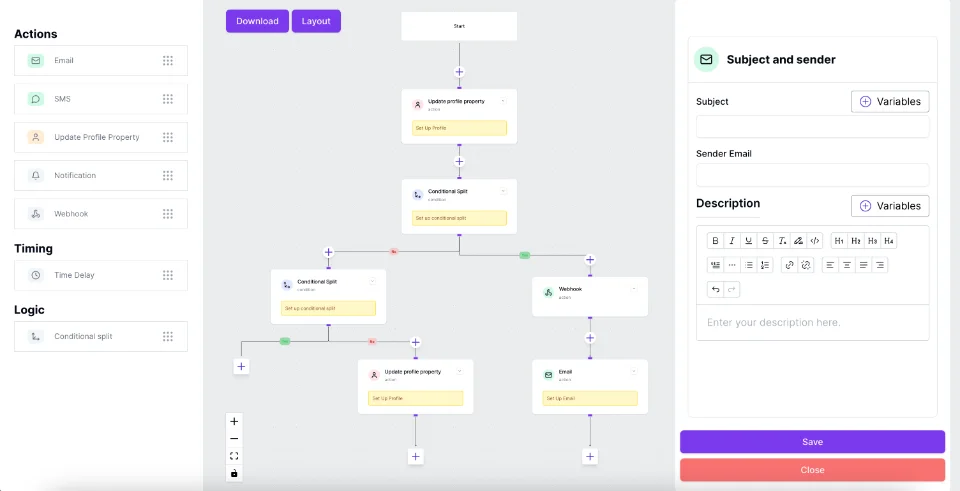
Imagine two users editing the same automation workflow. One user adds a Webhook trigger while another connects an email action to a condition node.
With a properly configured Liveblocks integration, changes made by one user can appear on the other user's canvas almost immediately.
This makes it possible to collaboratively create complex workflows without waiting for someone to finish editing.
2. Multiple Users on the Same Canvas
A collaborative React Flow application should make it easy to understand who is currently working on a workflow.
Liveblocks supports user presence, allowing applications to display information about active collaborators.
For example, a workflow editor can show:
- Active users in the workspace.
- User avatars and names.
- Other collaborators' cursor positions.
- Current editing activity.
- Real-time interaction indicators.
This creates a more connected experience, similar to collaborative tools such as Figma and other multiplayer design applications.
3. Shared Workflow State
A workflow consists of more than just its visual appearance. It contains nodes, edges, configurations, metadata, and other information.
Liveblocks provides shared storage that can be used to synchronize persistent collaborative state.
For a React Flow application, developers can use this shared state to manage:
- Node positions and properties.
- Edge connections and configurations.
- Node types and custom data.
- Workflow-level metadata.
- Changes made by different collaborators.
The application should also handle concurrent updates carefully to ensure that users see a consistent workflow.
4. Collaborative Workflow Editing
Real-time collaboration becomes especially useful when building complex automation systems.
Consider a workflow containing Webhook triggers, email actions, database updates, AI prompts, and conditional branches.
Different team members can work on the same workflow, discuss changes, and improve the automation together.
This approach is useful for SaaS workflow builders, automation platforms, visual programming tools, and internal business process applications.
How React Flow and Liveblocks Work Together
The integration can be divided into a few important layers.
React Flow – Visual Canvas
React Flow handles the visual workflow editor, including nodes, edges, connections, dragging, zooming, and custom node components.
Liveblocks – Collaboration Layer
Liveblocks manages shared rooms, real-time storage, user presence, and communication between connected users.
Application State – Workflow Data
The application maintains the workflow structure, including nodes, edges, and node configurations, and synchronizes relevant changes through Liveblocks.
Backend – Persistence and Business Logic
A backend can store workflow data permanently, manage permissions, and handle application-specific operations.
A typical collaboration architecture looks like this:
- A user opens a workflow and joins its Liveblocks room.
- Liveblocks loads the shared collaborative state.
- React Flow renders the nodes and edges on the canvas.
- A user modifies a node, connection, or position.
- The application synchronizes the change through Liveblocks.
- Other connected users receive the update and render the latest workflow state.
This architecture allows developers to build multiplayer workflow editors while keeping the visual rendering responsibilities separate from the collaboration infrastructure.
Important Features for a Collaborative React Flow Builder
When developing a production-ready collaborative canvas, there are several additional features worth considering.
User Presence and Cursor Tracking
Display collaborator avatars and cursor positions so users can understand where other team members are working.
Conflict Management
When multiple users edit the same node or workflow property, the application needs a strategy for handling concurrent updates. Liveblocks' collaborative data structures can help, but the application must still define appropriate update behavior.
Undo and Redo
A collaborative workflow editor should provide a reliable history mechanism. Consider how undo and redo should behave when changes originate from multiple users.
Access Control
Not every collaborator needs permission to modify a workflow. Support different roles, such as owner, editor, and viewer, to control access.
Workflow Persistence
Real-time synchronization should not replace permanent data storage. Save workflow versions and important changes to a database so users can return to their work later.
When Should You Use Liveblocks with React Flow?
This combination is particularly useful when your application requires multiple users to interact with the same visual workspace.
Common use cases include:
- SaaS Workflow Builders: Allow teams to create and manage automation workflows together.
- Visual Programming Tools: Enable developers to design node-based applications collaboratively.
- Flowchart Applications: Let multiple users build diagrams and process flows simultaneously.
- AI Workflow Editors: Allow teams to design AI agents, LLM pipelines, and automated processes.
- Business Process Management: Help teams collaboratively design and maintain business workflows.
- Team Collaboration Platforms: Build shared visual workspaces for planning, brainstorming, and system design.
Conclusion
Combining React Flow with Liveblocks provides a practical foundation for building real-time collaborative workflow editors. React Flow takes care of the interactive node-based canvas, while Liveblocks provides the infrastructure for shared state, user presence, and real-time communication.
Whether you are building a SaaS workflow builder, an AI automation platform, or a collaborative visual programming tool, this combination can help transform a traditional single-user canvas into a multiplayer experience.
The result is a more interactive and connected workflow editor where multiple users can design, modify, and manage complex workflows together.
 VisualFlow