What Is React Flow Klaviyo Flow?
React Flow Klaviyo Flow is an interactive visual workflow builder inspired by modern marketing automation platforms such as Klaviyo. Built using React Flow, this example demonstrates how developers can create sophisticated automation sequences with interconnected nodes, conditional branching, messaging actions, and customizable workflow logic.
The interface provides a visual canvas where users can design, manage, and organize automated customer communication journeys without manually configuring complex workflow structures.
Instead of managing automation through traditional forms or lengthy configuration pages, users can visualize the entire process as an interconnected flowchart.
The example showcases how React Flow can power a modern drag-and-drop marketing automation builder, making it suitable for SaaS applications, customer engagement platforms, CRM systems, and AI-powered communication tools.
Key Features of React Flow Klaviyo Flow
1. Interactive Drag-and-Drop Workflow Builder
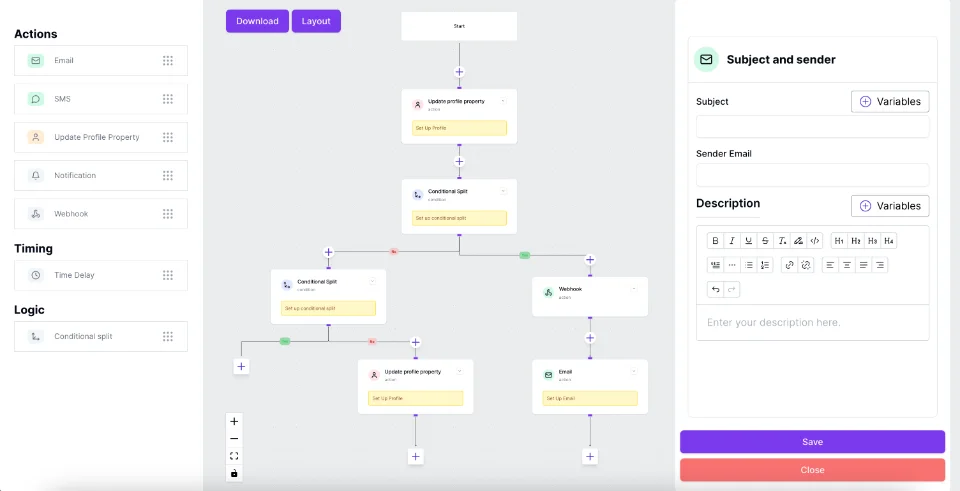
The React Flow Klaviyo Flow example provides a flexible visual canvas for designing automated workflows.
Users can organize different automation steps, connect actions, and visualize how information travels between nodes.
The workflow editor supports the development of complex automation structures while maintaining a clean, understandable interface.
Key capabilities include:
- Visual workflow creation using interconnected nodes.
- Customizable automation action blocks.
- Interactive node connections and workflow paths.
- Zooming, panning, and canvas navigation.
- Mini-map navigation for larger workflows.
- Structured workflow visualization.
This visual approach simplifies workflow development and helps users understand the relationship between different automation actions.
2. Multi-Channel Messaging Automation
One of the most important features demonstrated in the Klaviyo-inspired React Flow example is its support for multiple communication channels.
The building-block sidebar includes several messaging actions that can be incorporated into an automated customer journey.
Send WhatsApp Message
The WhatsApp action represents an automated messaging step that can be used to send notifications, promotional messages, customer updates, or follow-up communications.
Send Conversational Message
The conversational messaging block represents an AI-powered or chatbot-based interaction. It can be used to design automated conversations, collect customer responses, and guide users through personalized communication journeys.
Voice Call
The voice call action demonstrates how AI-powered calling can become part of a broader customer engagement workflow.
Send SMS
The SMS action represents automated text messaging for reminders, notifications, promotional campaigns, and customer follow-ups.
By combining these communication actions, developers can design omnichannel marketing automation workflows that coordinate customer interactions across multiple messaging platforms.
3. Conditional Branching with Yes/No Logic
Conditional branching is a fundamental component of advanced workflow automation.
The React Flow Klaviyo Flow example demonstrates a condition node that divides the workflow into two distinct paths:
- Yes Path: Executes the actions associated with a satisfied condition.
- No Path: Executes alternative actions when the condition is not satisfied.
For example, a marketing workflow could check whether a customer has responded to a previous message.
If the customer responds, the workflow can proceed with a conversational messaging action.
If the customer does not respond, the workflow can follow an alternative path and send a WhatsApp reminder.
This approach enables developers to create dynamic automation experiences based on customer behavior, business rules, or predefined conditions.
4. Automated Timing and Wait Actions
Timing plays an important role in marketing automation.
The workflow building-block panel includes a Wait action, which represents a configurable delay between automation steps.
Wait nodes can be used to design sequences such as:
- Sending a follow-up message after 24 hours.
- Waiting before delivering promotional content.
- Delaying a reminder until a scheduled time.
- Creating multi-day customer onboarding sequences.
- Introducing intervals between automated communication actions.
When connected to an execution engine, these timing rules can help businesses deliver messages at appropriate moments rather than sending every communication immediately.
5. Custom React Flow Nodes
The example demonstrates a structured approach to creating reusable custom nodes with React Flow.
Different node types represent specific automation functions, including triggers, messaging actions, conditions, and workflow endpoints.
Each node uses a compact card-based interface with recognizable icons, status indicators, and connection points.
Some action nodes also display configuration states, allowing users to identify steps that require additional setup.
This modular architecture is useful for developers building scalable workflow editors because new automation actions can be introduced without redesigning the entire canvas.
6. Workflow Status and Management
The interface includes several workflow management elements that help users understand the state of their automation.
These include:
- Save: A control for saving workflow changes.
- Activate: A control for enabling the configured automation.
- Workflow Status: Visual indicators showing the workflow's current state.
- Contact Metrics: An area displaying customer engagement information.
- Delivery Metrics: An area for monitoring message delivery performance.
- Last Edited: A timestamp indicating recent workflow modifications.
These elements demonstrate how a visual workflow builder can combine automation design with operational management.
In a production application, these controls would need to connect to backend services responsible for persistence, execution, and analytics.
How React Flow Klaviyo Flow Works
The example illustrates an automated customer communication journey using a connected sequence of workflow nodes.
Step 1: Start with an Automation Trigger
The workflow begins with an Abandoned Cart trigger.
In an e-commerce automation system, this type of trigger can initiate a recovery sequence when a customer adds products to their shopping cart but leaves without completing the purchase.
Step 2: Send an Initial Conversational Message
After the trigger, the workflow proceeds to a conversational messaging action.
This step represents the first automated attempt to engage the customer.
The message might remind the customer about their abandoned cart, provide assistance, or encourage them to complete the purchase.
Step 3: Evaluate a Condition
The next node introduces conditional logic.
The workflow evaluates a predefined rule and directs execution toward either the Yes or No branch.
In a real-world application, this condition might evaluate customer engagement, message responses, or purchase completion.
Step 4: Execute Different Communication Paths
The workflow splits into two paths.
Yes Branch: The example routes the customer toward another conversational messaging action.
No Branch: The alternative path routes the customer toward a WhatsApp messaging action.
This structure demonstrates how a single automation can support multiple customer communication strategies.
Step 5: End the Workflow
Both branches eventually reach their respective End nodes.
These endpoints visually indicate where each automation path terminates.
The resulting workflow provides a clear overview of the customer journey, from the initial trigger to the final messaging action.
Why Use React Flow for Marketing Automation?
React Flow, also known through the React Flow library @xyflow/react, provides a flexible foundation for building node-based interfaces.
It offers core capabilities for displaying nodes, managing connections, handling viewport interactions, and implementing custom workflow components.
Developers can use these capabilities to build specialized automation interfaces without implementing every canvas interaction from scratch.
Flexible Node-Based Architecture
React Flow allows developers to define different node types and customize their appearance and behavior.
This makes it particularly useful for marketing automation systems where triggers, actions, conditions, and delays require distinct visual representations.
Custom Connections and Branching
Developers can use React Flow handles and edges to represent relationships between workflow actions.
Custom connection logic can help enforce valid workflow structures and prevent unsupported connections.
Scalable Workflow Visualization
As automation sequences grow, users need a way to navigate complex structures.
React Flow provides viewport controls, zooming, panning, and mini-map capabilities that support the visualization of larger workflows.
Integration with Backend Automation Engines
React Flow primarily handles the visual editing experience.
Developers can integrate it with backend services to implement functionality such as:
- Workflow data persistence.
- Event-based automation triggers.
- Conditional rule evaluation.
- Scheduled task execution.
- WhatsApp and SMS API integration.
- AI-powered messaging services.
- Workflow analytics and execution logs.
This separation allows React Flow to serve as the visual editor while dedicated backend systems manage automation execution.
Practical Use Cases for React Flow Klaviyo Flow
E-commerce Abandoned Cart Recovery
Create automated recovery journeys that contact customers after they abandon shopping carts.
Combine conversational messages, conditional checks, and follow-up notifications to build personalized recovery sequences.
Customer Onboarding Automation
Design structured welcome sequences for newly registered customers.
Use messaging actions, delays, and conditional logic to introduce products, share helpful information, and encourage customer engagement.
AI-Powered Lead Nurturing
Build visual lead nurturing workflows that combine automated conversations with follow-up actions.
An AI agent can interact with potential customers while conditional branches determine the next communication step.
CRM Workflow Automation
Integrate the workflow editor into a customer relationship management platform to visualize lead follow-ups, customer communication sequences, and engagement activities.
Multi-Channel Marketing Campaigns
Create automated campaigns that coordinate WhatsApp, SMS, conversational messaging, and voice calls within a single visual interface.
React Flow Klaviyo Flow vs. Traditional Workflow Builders
| Feature | React Flow Klaviyo Flow Example | Traditional Form-Based Workflow |
|---|
| Workflow design | Visual node-based canvas | Forms and configuration screens |
| Conditional logic | Visible Yes/No branches | Rule-based configuration |
| Communication actions | Custom messaging nodes | Action menus or forms |
| Navigation | Zoom, pan, mini-map | Page or step navigation |
| Customization | Extensible React components | Depends on the platform |
| Workflow overview | Connected flow diagram | Often a sequential list |
| Integration | Requires application development | Depends on existing integrations |
The main advantage of a React Flow-based automation editor is the ability to visually represent complex workflows while maintaining flexibility over the interface and interaction model.
Who Should Use This React Flow Example?
The React Flow Klaviyo Flow example is particularly useful for:
React and Next.js Developers: Developers who want to build custom workflow editors, automation dashboards, or node-based SaaS interfaces.
SaaS Product Teams: Teams developing marketing automation platforms, CRM systems, or customer engagement applications.
UI/UX Designers: Designers exploring interactive workflow interfaces, node-based navigation, and visual automation patterns.
Marketing Technology Developers: Engineers creating systems for customer journeys, lead nurturing, campaign automation, and messaging orchestration.
AI Automation Builders: Developers working on AI agents, conversational automation, and event-driven communication workflows.
How to Build a Klaviyo-Style Workflow Builder Using React Flow
Developers can use the React Flow library as the foundation for implementing a similar workflow editor.
A typical development process includes the following stages.
1. Set Up React Flow
Install the React Flow package in a React or Next.js project.
npm install @xyflow/react
2. Define Custom Node Types
Create reusable components for each workflow action.
Examples include:
- TriggerNode
- WhatsAppNode
- ConversationalMessageNode
- ConditionNode
- WaitNode
- EndNode
Each component can include its own icon, configuration fields, status indicators, and connection handles.
3. Implement Workflow Connections
Use React Flow edges and handles to connect automation nodes.
For condition nodes, create separate source handles for Yes and No outcomes.
Create a categorized sidebar containing available workflow blocks.
Organize actions into groups such as Messaging, Timing, Logic, and Triggers.
Users can then select or drag these blocks onto the workflow canvas.
5. Add Node Configuration
Create a configuration panel that allows users to edit action-specific settings.
For example, a WhatsApp node might require a message template, recipient mapping, and delivery configuration.
6. Implement Workflow Persistence
Store workflow nodes, edges, and configuration data in a database.
The saved structure can later be loaded into React Flow for continued editing.
7. Connect an Automation Execution Engine
Implement a backend system that interprets the workflow graph and executes actions according to their configured rules.
The execution engine should handle scheduling, retries, error states, and external API communication independently of the visual editor.
Frequently Asked Questions
What is React Flow Klaviyo Flow?
React Flow Klaviyo Flow is a visual marketing automation workflow example built with React Flow. It demonstrates how to design interconnected messaging actions, triggers, and conditional branches through an interactive node-based interface.
Can React Flow be used to build a Klaviyo-style automation builder?
Yes. React Flow provides the canvas, nodes, edges, and interaction capabilities required to build a Klaviyo-inspired workflow editor. Developers must implement the underlying automation logic and integrations separately.
Does React Flow support conditional branching?
Yes. Developers can create custom condition nodes with multiple source handles and connect them to different workflow paths.
Can I integrate WhatsApp and SMS with React Flow?
Yes. React Flow can provide the visual interface for WhatsApp and SMS automation. Actual message delivery requires integration with appropriate messaging APIs and backend services.
Is React Flow suitable for complex automation workflows?
Yes. React Flow supports custom nodes, edges, viewport navigation, and interactive graph editing. For larger workflows, developers may also implement automatic layout, validation, and performance optimizations.
Does React Flow execute automation workflows automatically?
No. React Flow is primarily a library for building node-based user interfaces. Workflow execution requires a separate automation engine or backend service.
Conclusion
React Flow Klaviyo Flow demonstrates how a modern visual workflow builder can simplify the design of marketing automation and customer communication sequences.
By combining custom nodes, conditional branching, messaging actions, timing blocks, and interactive canvas controls, developers can create intuitive interfaces for managing sophisticated automation journeys.
The example is particularly valuable for building SaaS automation platforms, AI-powered customer engagement systems, CRM workflow editors, and omnichannel marketing tools.
 VisualFlow