Modern applications often require powerful visual tools to design, manage, and orchestrate complex workflows. React Flow Flow Craft Studio is a production-ready visual workflow editor built with React Flow, designed to make workflow creation more intuitive, flexible, and interactive.
What Is React Flow Flow Craft Studio?
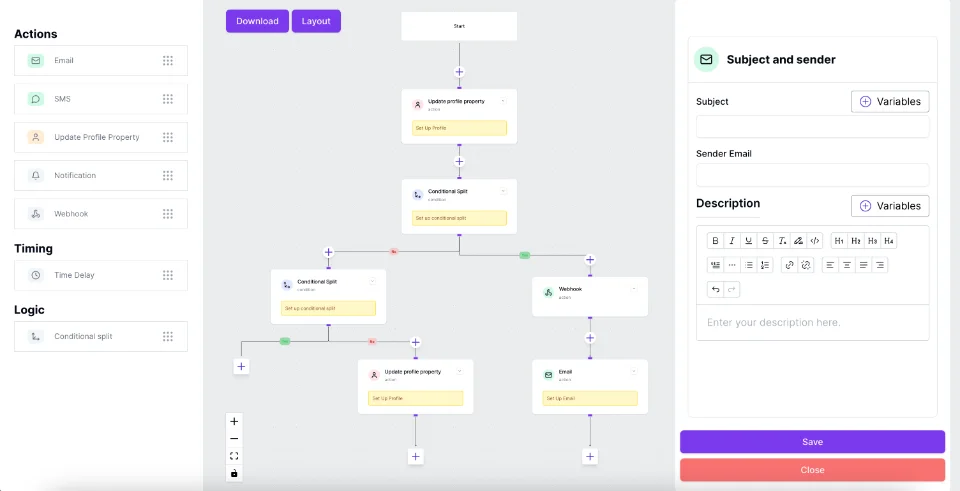
React Flow Flow Craft Studio demonstrates how developers can build an advanced workflow editor using the React Flow ecosystem. It provides a visual canvas where users can create nodes, connect components, and organize complex workflow structures.
The studio showcases a multi-node workflow architecture with interconnected components, custom node designs, connection points, and a clean visual interface. It provides a foundation for building workflow automation platforms, process editors, infrastructure diagrams, and other node-based applications.
Key Features
- Interactive Workflow Builder: Create and connect workflow nodes through an intuitive visual canvas.
- Custom Nodes and Edges: Design reusable node components with customized connection points and visual styles.
- Multi-Node Architecture: Organize complex workflows into multiple connected sections.
- Visual Connection Management: Establish relationships between different workflow components.
- Zoom and Canvas Controls: Navigate large workflow diagrams with convenient viewport controls.
- Customizable Interface: Extend the studio to support different workflow requirements and application use cases.
Why Build a Workflow Editor with React Flow?
React Flow (XYFlow) provides a flexible foundation for building node-based applications in React. Its customizable nodes, edges, handles, and interactive canvas make it suitable for developing visual workflow editors and automation platforms.
Developers can extend React Flow with custom layouts, state management, validation logic, and advanced interactions to create sophisticated workflow experiences.
Use Cases
React Flow Flow Craft Studio can serve as inspiration for building:
- Workflow Automation Builders
- Business Process Management (BPM) Tools
- Visual Programming Interfaces
- Network and Infrastructure Editors
- AI Agent Workflow Builders
- Data Processing Pipelines
- Production Process Editors
Explore More React Flow Examples with VisualFlow
Looking for inspiration to build your next node-based application?
VisualFlow provides practical React Flow examples, interactive studios, and production-oriented UI implementations to help developers understand how to create sophisticated visual applications.
Explore more examples and discover new possibilities for building workflow editors with React Flow.
Explore: https://www.visualflow.dev/
Browse Examples: https://explore.visualflow.dev/examples
Conclusion
React Flow Flow Craft Studio demonstrates the flexibility of React Flow for building interactive and customizable workflow applications. Whether you are developing an automation platform, a visual programming tool, or a complex process editor, this example offers inspiration for creating modern node-based experiences.
 VisualFlow