Introduction
Managing projects and tasks doesn't have to be complicated. React Flow Canvasflow Tasks introduces a modern, visual approach to task management by combining the flexibility of an infinite canvas with the familiar functionality of a Kanban board.
This premium VisualFlow template provides a complete foundation for building interactive, node-based task management applications using React Flow. Whether you're creating a project management tool, a workflow automation platform, or a collaborative task management system, Canvasflow Tasks makes it easier to visualize, organize, and manage work.
What Is React Flow Canvasflow Tasks?
React Flow Canvasflow Tasks is a canvas-based task management template that transforms traditional task boards into interactive visual workspaces.
Instead of being restricted to static lists, users can organize tasks within customizable columns, move cards across different workflow stages, and manage projects through an intuitive drag-and-drop interface.
The template demonstrates how React Flow can be used to build sophisticated task management experiences with custom nodes, interactive controls, and a flexible workspace.
Key Features of Canvasflow Tasks
1. Interactive Kanban Workspace
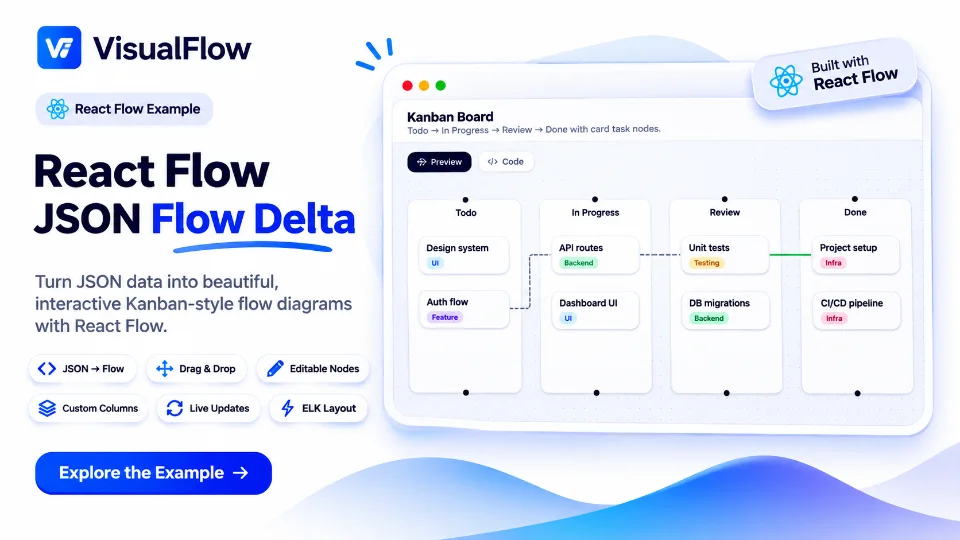
The template features a fully interactive Kanban board where tasks are organized into columns such as Backlog, In Progress, Todo, and Done.
Users can move between different stages of a project, making it easier to track progress and maintain a clear overview of ongoing activities.
2. Custom Task Nodes
Create visually rich task cards with custom information, including:
- Task titles and descriptions
- Priority indicators such as Critical, High, and Medium
- Category labels and tags
- Status-based organization
- Customizable card layouts
With React Flow's custom node capabilities, developers can extend these task cards to support additional functionality.
3. Drag-and-Drop Functionality
The drag-and-drop experience makes task management intuitive and efficient. Users can move tasks between columns, reorganize workflows, and interact directly with elements on the canvas.
This functionality demonstrates how React Flow can support complex interactions beyond traditional node-based diagrams.
4. Infinite Canvas Experience
The workspace provides a flexible canvas with zoom, pan, and navigation controls, allowing users to explore and manage larger projects.
The infinite canvas approach offers greater flexibility than conventional task management interfaces, especially when working with complex workflows and multiple project stages.
5. Flexible Board Management
The template includes interactive board controls that allow users to create new boards, manage columns, and organize tasks within a structured workspace.
This makes it a practical starting point for developing scalable project management applications.
How It Works
Canvasflow Tasks combines the core capabilities of React Flow with custom UI components to create a complete visual task management experience.
The workflow follows a simple structure:
- Create a board to organize a project.
- Add columns to represent workflow stages.
- Create tasks with descriptions, priorities, and labels.
- Move tasks visually using drag-and-drop interactions.
- Track progress as tasks move through different stages.
This modular structure makes it easy to customize the template according to specific business or project requirements.
Why Build Task Management with React Flow?
React Flow provides developers with the flexibility to build custom visual interfaces that go beyond conventional dashboards and task lists.
With React Flow, you can:
- Build custom nodes and interactive components.
- Create dynamic and flexible workflow layouts.
- Implement drag-and-drop interactions.
- Connect tasks, processes, and workflow elements.
- Develop scalable visual applications using React.
Canvasflow Tasks demonstrates how these capabilities can be combined to create a polished, production-inspired task management interface.
Who Is This Template For?
React Flow Canvasflow Tasks is ideal for:
- Developers building project management applications
- SaaS founders creating productivity platforms
- Teams exploring visual workflow management
- React developers learning advanced React Flow customization
- Designers prototyping interactive task management experiences
Whether you're developing a lightweight Kanban tool or a more sophisticated workflow management platform, this template provides a strong starting point.
Build Your Own Visual Task Management Experience
The React Flow Canvasflow Tasks template showcases how visual interfaces can make project management more intuitive, interactive, and flexible.
By combining custom React Flow nodes, drag-and-drop interactions, and an infinite canvas, developers can create task management applications that adapt to their users' needs.
Explore React Flow Canvasflow Tasks on VisualFlow and start building your next visual productivity application.
 VisualFlow